Labels

Tuesday, 23 May 2017

DATABASE (Back-end)

DATABASE (DB)


A database is a collection of information that is organized so that it can be easily accessed, managed and updated.
Data is organized into rows, columns and tables, and it is indexed to make it easier to find relevant information. Data gets updated, expanded and deleted as new information is added. Databases process workloads to create and update themselves, querying the data they contain and running applications against it.

Evolution of databases

Databases have evolved since their inception in the 1960s, beginning with hierarchical and network databases, through the 1980s with object-oriented-database, and today with SQL and NoSQL databases and cloud-database.

Relational database


Relational databases are made up of a set of tables with data that fits into a predefined category. Each table has at least one data category in a column, and each row has a certain data instance for the categories which are defined in the columns.
The Structure Query Language (SQL) is the standard user and application program interface for a relational database. Relational databases are easy to extend, and a new data category can be added after the original database creation without requiring that you modify all the existing applications.

Distributed database
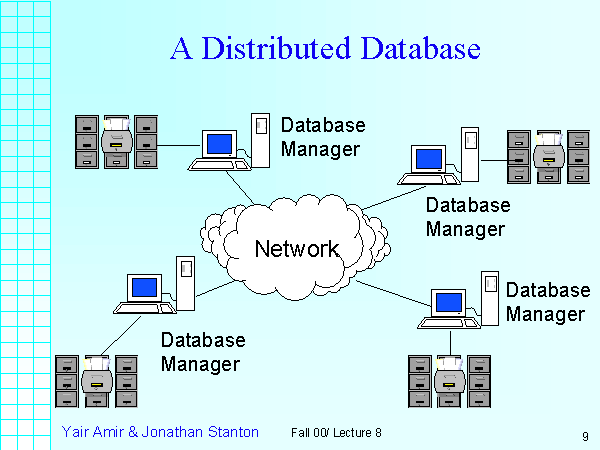
 

A distributed database is a database in which portions of the database are stored in multiple physical locations, and in which processing is dispersed or replicated among different points in a network.
Distributed databases can be homogeneous or heterogeneous. All the physical locations in a homogeneous distributed database system have the same underlying hardware and run the same operating systems and database applications. The hardware, operating systems or database applications in a heterogeneous distributed database may be different at each of the locations.

Cloud database


A cloud database is a database that has been optimized or built for a virtualized environment, either in a hybrid cloud, public cloud or private cloud. Cloud databases provide benefits such as the ability to pay for storage capacity and bandwidth on a per-use basis, and they provide scalability on demand, along with high availability.
A cloud database also gives enterprises the opportunity to support business applications in a software-as-a-system deployment.

NoSQL database


NoSQL Database are useful for large sets of distributed data.
NoSQL databases are effective for big data performance issues that relational databases aren't built to solve. They are most effective when an organization must analyze large chunks of unstructured data or data that's stored across multiple virtual servers in the cloud.

Object-oriented database


Items created using object-oriented-database are often stored in relational databases, but object-oriented databases are well-suited for those items.
An object-oriented database is organized around objects rather than actions, and data rather than logic. For example, a multimedia record in a relational database can be a definable data object, as opposed to an alphanumeric value.

Graph database


A graph-oriented database, or graph,database, is a type of NoSQL database that uses graph theory to store, map and query relationships. Graph databases are basically collections of nodes and edges, where each node represents an entity, and each edge represents a connection between nodes.
Graph databases are growing in popularity for analyzing interconnections. For example, companies might use a graph database to mine data about customers from social media.

Sunday, 21 May 2017

jQuery

  • jQuery is a JavaScript Library.
  • jQuery greatly simplifies JavaScript programming.
  • jQuery is easy to learn.

What is jQuery?

  • jQuery is a lightweight, "write less, do more", JavaScript library.
  • The purpose of jQuery is to make it much easier to use JavaScript on your website.
  • jQuery takes a lot of common tasks that require many lines of JavaScript code to accomplish, and wraps them into methods that you can call with a single line of code.
  • jQuery also simplifies a lot of the complicated things from JavaScript, like AJAX calls and DOM manipulation.
  • The jQuery library contains the following features:
  1. HTML/DOM manipulation
  2. CSS manipulation
  3. HTML event methods
  4. Effects and animations
  5. AJAX
  6. Utilities
The jQuery library is a single JavaScript file, and you reference it with the HTML <script> tag (notice that the <script> tag should be inside the <head> section):

<head>
<script src="jquery-3.2.1.min.js"></script>
</head>

<head>
<script src="https://ajax.googleapis.com/ajax/libs/jquery/3.2.1/jquery.min.js"></script>
</head>

<head>
<script src="https://ajax.aspnetcdn.com/ajax/jQuery/jquery-3.2.1.min.js"></script>
</head>
 

Friday, 19 May 2017

JavaScript Variables


All JavaScript variables must be identified with unique names.
These unique names are called identifiers.
Identifiers can be short names (like x and y) or more descriptive names (age, sum, totalVolume).
The general rules for constructing names for variables (unique identifiers) are:
  • Names can contain letters, digits, underscores, and dollar signs.
  • Names must begin with a letter
  • Names can also begin with $ and _ (but we will not use it in this tutorial)
  • Names are case sensitive (y and Y are different variables)
  • Reserved words (like JavaScript keywords) cannot be used as names
JavaScript identifiers are case-sensitive.

The Assignment Operator

In JavaScript, the equal sign (=) is an "assignment" operator, not an "equal to" operator.
This is different from algebra. The following does not make sense in algebra:
x = x + 5

The "equal to" operator is written like == in JavaScript.

JavaScript Data Tyes

JavaScript variables can hold numbers like 100 and text values like "John Doe".
In programming, text values are called text strings.
JavaScript can handle many types of data, but for now, just think of numbers and strings.
Strings are written inside double or single quotes. Numbers are written without quotes.
If you put a number in quotes, it will be treated as a text string.

var pi = 3.14;
var person = "John Doe";
var answer = 'Yes I am!';


Declaring (Creating) JavaScript Variables

Creating a variable in JavaScript is called "declaring" a variable.
You declare a JavaScript variable with the var keyword:

var carName;
After the declaration, the variable has no value. (Technically it has the value of undefined)
To assign a value to the variable, use the equal sign:

carName = "Volvo"; 
 
You can also assign a value to the variable when you declare it:

var carName = "Volvo";

One Statement, Many Variables

You can declare many variables in one statement.
Start the statement with var and separate the variables by comma:

var person = "John Doe", carName = "Volvo", price = 200;

A declaration can span multiple lines:

var person = "John Doe",
carName = "Volvo",
price = 200;


Value = undefined

In computer programs, variables are often declared without a value. The value can be something that has to be calculated, or something that will be provided later, like user input.
A variable declared without a value will have the value undefined.

The variable carName will have the value undefined after the execution of this statement:

var carName;

Re-Declaring JavaScript Variables

If you re-declare a JavaScript variable, it will not lose its value.

The variable carName will still have the value "Volvo" after the execution of these statements:

var carName = "Volvo";
var carName;

JavaScript Arithmetic

As with algebra, you can do arithmetic with JavaScript variables,
 using operators like = and +:

var x = 5 + 2 + 3;

You can also add strings, but strings will be concatenated:


var x = "John" + " " + "Doe";

Also try this:

var x = "5" + 2 + 3;
 
If you put a number in quotes, the rest of the numbers will be treated as strings, and concatenated.

Thursday, 18 May 2017

JavaScript


What is JavaScript?
  • JavaScript is the programming language of HTML and the Web.
  • JavaScript is easy to learn.

Why Study JavaScript?

JavaScript is one of the 3 languages all web developers must learn:
   1. HTML to define the content of web pages
   2. CSS to specify the layout of web pages
   3. JavaScript to program the behavior of web pages

JavaScript Can Change HTML Content

One of many JavaScript HTML methods is getElementById().
This example uses the method to "find" an HTML element (with id="demo") and changes the element content (innerHTML) to "Hello JavaScript":

document.getElementById("demo").innerHTML = "Hello JavaScript";  

JavaScript Can Change HTML Attributes

This example changes an HTML image by changing the src (source) attribute of an <img> tag:

<onclick="document.getElementById('myImage').src='pic_bulbon.gif'">


JavaScript Can Change HTML Styles (CSS)

Changing the style of an HTML element, is a variant of changing an HTML attribute:

document.getElementById("demo").style.fontSize = "25px";
or
document.getElementById('demo').style.fontSize = '25px';  


JavaScript Can Hide HTML Elements

Hiding HTML elements can be done by changing the display style:

document.getElementById("demo").style.display = "none";
or
document.getElementById('demo').style.display = 'none';  


JavaScript Can Show HTML Elements

Showing hidden HTML elements can also be done by changing the display style:

document.getElementById("demo").style.display = "block";
or
document.getElementById('demo').style.display = 'block';  


USING THE TERMINAL

USING THE TERMINAL  

Introduction to using the command-line interface terminal

-File & Directory Commands-

  • pwd: The pwd command will allow you to know in which directory you're located (pwd stands for "print working directory"). 
  • ls: The ls command will show you ('list') the files in your current directory.
  • cd: The cd command will allow you to change directories.
  • cp: The cp command will make a copy of a file for you.  
  • mv: The mv command will move a file to a different location or will rename a file.
  • rm: Use this command to remove or delete a file in your directory.  
  • rmdir: The rmdir command will delete an empty directory.
  • mkdir: The mkdir command will allow you to create directories.
  • cad:As a user, you often need to view some of text or code from your script. Again, one of the Linux basic commands is cat command. It will show you the text inside your file.
  • nano:Nano is text editor in console, if the <file-name> doesn’t exist nano creates the file and if exist nano opens the file.

Wednesday, 17 May 2017

Capitalization

Capitalization

Capitalization means using a capital letter (for example, A instead of a) . The use of capital letters helps readers read your writing without confusion.

Always capitalize the following:

The first word in a sentence.
  • I grew up in India.
  • She left a message on my phone.
The pronoun I.
  • This country is where I dreamed of.
The first letter of a proper noun (specific name).
  • David wants to play soccer with us.
  • This letter is from Chang.
  • I graduated from the University of New York.
  • I like Coca-Cola.
  • She likes Godiva chocolates.
The first letter of months, days, and holidays (but not seasons).
  • Today is June 8, 2011.
  • Susie's birthday is this Thursday.
  • The shops are closed on Easter.
  • This summer is going to be very hot.
The first letter of nationalities, religions, races of people, and languages.
  • We often eat Italian food.
  • I want to master many languages, such as Spanish, Korean, Chinese, and Russian.
  • There is one Christian church in my town.
The first letter in a person's title.
  • This is Dr. Simon.
  • I got it from Mr. Tom.
Geographic areas: cities, states, countries, mountains, oceans, rivers, etc.
  • My destination is Paris, France.
  • Hawaii is in the middle of the Pacific Ocean.
Historical periods.
  • The Renaissance began in the 14th century.
  • The Qing Dynasty is the last dynasty in China.
The first letter of each major word in the title of a book, movie, article, etc.
  • Tolstoy's War and Peace is my favorite novel.
  • I found the article "How to Write a Good Cover Letter" in this magazine.


Possessive Nouns

Possessive Nouns

Possessive nouns are used to indicate ownership.

Possessive nouns usually are formed by adding an apostrophe (') and s.
  • John's book
  • Kerry's car
  • Grandma's mirror
When a noun is plural and ends in s, just add an apostrophe (').
  • The kids' toys
  • My parents' house
  • The teachers' lounge
If two people own one thing, add the apostrophe and s to the second person only.
  • John and Mary's new house
  • David and Sue's wedding
  • Tom and Doug's car
If two people own separate things, add the apostrophe and s for each person.
  • Susan's and Beth's books
  • Jean's and Dan's pants
  • Ben's and Jim's offices


Last day at Uki

Before Uki, I don’t know the fact that coding is like an ocean. Because I studied HTML and CSS only. I had some weaknesses like stage f...

Popular posts