Labels

Showing posts with label Uki. Show all posts

Saturday, 7 October 2017

Last day at Uki


Before Uki, I don’t know the fact that coding is like an ocean. Because I studied
HTML and CSS only. I had some weaknesses like stage fear, can’t speak English properly.
So I needed a turning point to change my life after A/L. Uki is my turning point. Ukis’ study
systems changed my life in beautiful way.

In coding, they taught new languages like MongoDB, Sass, NodeJS and ReactJS.
Before I entered Uki I didn’t hear those languages names. But now I can develop an
application by using those languages. I had a knowledge to design frontend for the
application but now I can develope entire application. The teachers taught all languages in
easy way. They guided us every single seps in tech life.

Now, I’m developing my final project. When I develop my application, I understand more
and more about software development because software development means not only
study but also implementation. I find my strength and weaknesses when I develop my application.

In personal coaching, That’s an important subject in Uki and also my life. Because that
changed my life style. I overcame my weaknesses. The teacher guided me in good way.
When I struggle in my personal skills, she helped me to overcome that stage.

Overall Uki is an amazing place to develop your personal skills and entire applications.
Uki’s not only helped in your tech life but also help in your personal skills. I proud to say
I’m the student of Uki coding School’s first batch.

Tuesday, 8 August 2017

How to Start a Business 


1. Brainstorm ideas
2. Build a business plan
3. Assess your finances
4. Determine your legal business structure

5. Select your technology
6. Choose your partners
7. Build your team
08. Brand yourself and advertise
09. Grow your business


1. Brainstorm ideas


Every new business starts with an idea. Maybe there's something you're really knowledgeable and passionate about, or perhaps you think you've found a way to fill a gap in the marketplace. Wherever your interests lie, it's almost guaranteed that there's a way to turn it into a business.

Once you've narrowed your list of ideas down to one or two, do a quick search for existing companies in your chosen industry. Learn what current brand leaders are doing, and figure out how you can do it better. If you think your business can deliver something other companies don't (or deliver the same thing, but faster and cheaper), you've got a solid idea and are ready to create a business plan.

2. Build a business plan

Now that you have your idea in place, you need to ask yourself a few important questions: What is the purpose of your business? Who are you selling to? What are your end goals? How will you finance your startup costs? All of these questions can be answered in a well-written business plan.
A business plan helps you figure out where your company is going, how it will overcome any potential difficulties and what you need to sustain it.

3. Assess your finances


Starting any business has a price, so you need to determine how you're going to cover those costs. Do you have the means to fund your startup, or will you need to borrow money? If you are planning to make your new business your full-time job, it's wise to wait until you have at least some money put away for startup costs and for sustaining yourself in the beginning before you start making a profit.
While many entrepreneurs put their own money into their new companies, it's very possible that you'll need financial assistance. A commercial loan through a bank is a good starting point, although these are often difficult to secure.
Startups requiring a lot more funding up front may want to consider an investor. Investors usually provide several million dollars or more to a fledgling company, with the expectation that the backers will have a hands-on role in running your business.


4. Determine your legal business structure


Before you can register your company, you need to decide what kind of entity it is. Your business structure legally affects everything from how you file your taxes to your personal liability if something goes wrong.
If you own the business entirely by yourself and plan to be responsible for all debts and obligations, you can register for a sole proprietorship. Alternatively, a partnership, as its name implies, means that two or more people are held personally liable as business owners.
If you want to separate your personal liability from your company's liability, you may want to consider forming one of several different types of corporations. This makes a business a separate entity apart from its owners, and therefore, corporations can own property, assume liability, pay taxes, enter into contracts, sue and be sued like any other individual. One of the most common structures for small businesses, however, is the limited liability corporation (LLC). This hybrid structure has the legal protections of a corporation while allowing for the tax benefits of a partnership.

5. Select your technology

Just about every business today needs a solid set of tech tools to operate. Some will be more tech-heavy than others depending on the industry, but at the very least, you will likely need a powerful and reliable business laptop or smart device to help you keep things organized.
Since many key business functions — accounting, invoicing, point-of-sale software, presentations, etc. — can now be managed via mobile apps, you might be able to get away with just a smartphone or tablet. For more complex business functions, you'll want to consider a computer with strong security features, storage options and performance speed.
For those who want to operate their business on a smart device, think about whether you'll need a separate phone or tablet for your professional apps and data. For instance, you could route your calls through a third-party app on your existing phone so you don't need to give out your personal cell number. However, if you use the same apps for business and personal purposes, it might be easier to separate them so you don't accidentally share information with the wrong audience.

6. Choose your partners

Running a business can be overwhelming, and you're probably not going to be able to do it all on your own. That's where third-party vendors come in. Companies in every industry from HR to business phone systems exist to partner with you and help you run your business better.
When you're searching for B2B partners, you'll have to choose very carefully. These companies will have access to vital and potentially sensitive business data, so it's critical to find someone you can trust.

7. Build your team

Unless you're planning to be your only employee, you're going to need to hire a great team to get your company off the ground. Joe Zawadzki, CEO and founder of MediaMath, said entrepreneurs need to give the "people" element of their businesses the same attention they give their products.
"Your product is built by people," Zawadski said. "Identifying your founding team, understanding what gaps exist, and [determining] how and when you will address them should be top priority. Figuring out how the team will work together ... is equally important. Defining roles and responsibility, division of labor, how to give feedback, or how to work together when not everyone is in the same room will save you a lot of headaches down the line."

08. Brand yourself and advertise


Before you start selling your product or service, you need to build up your brand and get a following of people ready to jump when you open your literal or figurative doors for business.
Create a logo that can help people easily identify your brand, and be consistent in using it across all of your platforms, including your all-important company website. Use social media to spread the word about your new business, perhaps as a promotional tool to offer coupons and discounts to followers once you launch. Be sure to also keep these digital assets up to date with relevant, interesting content about your business and industry.

09. Grow your business


Your launch and first sales are only the beginning of your task as an entrepreneur. In order to make a profit and stay afloat, you always need to be growing your business. It's going to take time and effort, but you'll get out of your business what you put into it.
Collaborating with more established brands in your industry is a great way to achieve growth. Reach out to other companies or even influential bloggers and ask for some promotion in exchange for a free product sample or service. Partner with a charity organization and volunteer some of your time or products to get your name out there.

Tuesday, 1 August 2017

Cool React App

 Tic Tac Toe

  • Create React App doesn't handle back-end logic or databases; it just creates a front-end build
  • Past this codes on terminal.
sudo npm install -g create-react-app
create-react-app my-app

cd my-app
npm start
  • Delete all files in the src/ folder of the new project.

  • Add a file named index.css in the src/ folder with this CSS code.
    body {
      font: 14px "Century Gothic", Futura, sans-serif;
      margin: 20px;
    }

    ol, ul {
      padding-left: 30px;
    }

    .board-row:after {
      clear: both;
      content: "";
      display: table;
    }

    .status {
      margin-bottom: 10px;
    }

    .square {
      background: #fff;
      border: 1px solid #999;
      float: left;
      font-size: 24px;
      font-weight: bold;
      line-height: 34px;
      height: 34px;
      margin-right: -1px;
      margin-top: -1px;
      padding: 0;
      text-align: center;
      width: 34px;
    }

    .square:focus {
      outline: none;
    }

    .kbd-navigation .square:focus {
      background: #ddd;
    }

    .game {
      display: flex;
      flex-direction: row;
    }

    .game-info {
      margin-left: 20px;
    }

     
  • Add a file named index.js in the src/ folder with this JS code, and then add three lines to the top of it:

    import React from 'react';
    import ReactDOM from 'react-dom';
    import './index.css'; 
     
     Now if you run npm start in the project folder
    and open http://localhost:3000 in the browser,
    you should see an empty tic-tac-toe field. 
     
    • Install language-babel package and follow the instructions.
    • Install via ATOM or by using apm install language-babel
    • Then, copy and past this code below line 3 in index.js.

    function Square(props) {
      return (
        <button className="square" onClick={props.onClick}>
          {props.value}
        </button>
      );
    }

    class Board extends React.Component {
      renderSquare(i) {
        return (
          <Square
            value={this.props.squares[i]}
            onClick={() => this.props.onClick(i)}
          />
        );
      }

      render() {
        return (
          <div>
            <div className="board-row">
              {this.renderSquare(0)}
              {this.renderSquare(1)}
              {this.renderSquare(2)}
            </div>
            <div className="board-row">
              {this.renderSquare(3)}
              {this.renderSquare(4)}
              {this.renderSquare(5)}
            </div>
            <div className="board-row">
              {this.renderSquare(6)}
              {this.renderSquare(7)}
              {this.renderSquare(8)}
            </div>
          </div>
        );
      }
    }

    class Game extends React.Component {
      constructor() {
        super();
        this.state = {
          history: [
            {
              squares: Array(9).fill(null)
            }
          ],
          stepNumber: 0,
          xIsNext: true
        };
      }

      handleClick(i) {
        const history = this.state.history.slice(0, this.state.stepNumber + 1);
        const current = history[history.length - 1];
        const squares = current.squares.slice();
        if (calculateWinner(squares) || squares[i]) {
          return;
        }
        squares[i] = this.state.xIsNext ? "X" : "O";
        this.setState({
          history: history.concat([
            {
              squares: squares
            }
          ]),
          stepNumber: history.length,
          xIsNext: !this.state.xIsNext
        });
      }

      jumpTo(step) {
        this.setState({
          stepNumber: step,
          xIsNext: (step % 2) === 0
        });
      }

      render() {
        const history = this.state.history;
        const current = history[this.state.stepNumber];
        const winner = calculateWinner(current.squares);

        const moves = history.map((step, move) => {
          const desc = move ? "Move #" + move : "Game start";
          return (
            <li key={move}>
              <a href="#" onClick={() => this.jumpTo(move)}>{desc}</a>
            </li>
          );
        });

        let status;
        if (winner) {
          status = "Winner: " + winner;
        } else {
          status = "Next player: " + (this.state.xIsNext ? "X" : "O");
        }

        return (
          <div className="game">
            <div className="game-board">
              <Board
                squares={current.squares}
                onClick={i => this.handleClick(i)}
              />
            </div>
            <div className="game-info">
              <div>{status}</div>
              <ol>{moves}</ol>
            </div>
          </div>
        );
      }
    }

    // ========================================

    ReactDOM.render(<Game />, document.getElementById("root"));

    function calculateWinner(squares) {
      const lines = [
        [0, 1, 2],
        [3, 4, 5],
        [6, 7, 8],
        [0, 3, 6],
        [1, 4, 7],
        [2, 5, 8],
        [0, 4, 8],
        [2, 4, 6]
      ];
      for (let i = 0; i < lines.length; i++) {
        const [a, b, c] = lines[i];
        if (squares[a] && squares[a] === squares[b] && squares[a] === squares[c]) {
          return squares[a];
        }
      }
      return null;
    }


    Yes, You did your Tic-Tac-Toe app now.

Monday, 31 July 2017

MICROPROCESSOR

MICROPROCESSOR


WHAT IS A MICROPROCESSOR?

 computer, large or small, can be represented functionally (in a simplified form) by the blockdiagram in Figure. 1.1. As shown, it comprises of three basic parts or sub-systems :


1. CENTER PROCESSING UNIT (CPU)

 It performs the necessary arithmetic and logic operations and controls the timing and general operation of the complete system.

2. INPUT / OUTPUT (I/O) DEVICES 

Input devices are used for feeding data into the CPU, examples of these devices are toggle switches, analog-to-digital converters, paper tape readers, card readers, keyboards, disk etc. The output devices are used for delivering the results of computations to the outside world; examples are light emitting diodes, cathode ray tube (CRT) displays, digital-to-analog converters, card and paper-tape punches, character printers, plotters, communication lines etc. The input-output subsystem thus allows the computer to usefully communicate with the outside world. Input-output devices are also called as peripherals.

3. Memory


It stores both the instructions to be executed (i.e., the program) and the data involved. It usually consists of both RAMs (random-access memories) and ROMS (read-only memories). A microprocessor is an integrated circuit designed to function as the CPU of a microcomputer.

WHAT IS INSIDE A MICROPROCESSOR ? 

The microprocessor or CPU reads each instruction from the memory, decodes it and executes it. It processes the data as required in the instructions. The processing is in the form of arithmetic and logical operations. The data is retrieved from memory or taken from an input device and the result of processing is stored in the memory or delivered to an appropriate output device, all as per the instructions. To perform all these functions, the μP (microprocessor) incorporates various functional units in an appropriate manner. Such an internal structure or organizational structure of μP, which determines how it operates, is known as its architecture.

A typical microprocessor architecture :


1. BUSSES 

μC (microcomputer), like all computers, manipulates binary information. The binary information is represented by binary digits, called bits. μC operates on a group of bits which are referred to as a word. The number of bits making- μP a word varies with the μP. Common word sizes are 4, 8, 12 and 16 bits (μPs with 32 bit-word have also of late entered the market). Another binary terms that will be of interest in subsequent discussions are the byte and the nibble, which represent a set of 8 bits and 4 bits, respectively.

2. Arithmetic Logical Unit (ALU)


The arithmetic-logic unit is a combinational network that performs arithmetic and logical operations on the data.

3. Internal Registers 

A number of registers are normally included in the microprocessor. These are used for temporary storage of data, instructions and addresses during execution of a program

Tuesday, 13 June 2017

API - application program interface

API - application program interface

Application program interface (API) is a set of routines, protocols, and tools for building software applications. An API specifies how software components should interact. Additionally, APIs are used when programming graphical user interface (GUI) components. A good API makes it easier to develop a program by providing all the building blocks. A programmer then puts the blocks together.

Different Types of APIs

There are many different types of APIs for operating systems, applications or websites. Windows, for example, has many API sets that are used by system hardware and applications — when you copy and paste text from one application to another, it is the API that allows that to work.

Most operating environments, such as MS-Windows, provide APIs, allowing programmers to write applications consistent with the operating environment. Today, APIs are also specified by websites. For example, Amazon or eBay APIs allow developers to use the existing retail infrastructure to create specialized web stores. Third-party software developers also use Web APIs to create software solutions for end-users.

Popular API Examples

ProgrammableWeb, a site that tracks more than 15,500 APIs, lists Google Maps, Twitter, YouTube, Flickr and Amazon Product Advertising as some of the the most popular APIs. The following list contains several examples of popular APIs:

1. Google maps API: Google Maps APIs lets developers embed Google Maps on webpages using a JavaScript or Flash interface. The Google Maps API is designed to work on mobile devices and desktop browsers.

2.  YouTube API: Google's APIs lets developers integrate YouTube videos and functionality into websites or applications. YouTube APIs include the YouTube Analytics API, YouTube Data API, YouTube Live Streaming API, YouTube Player APIs and others.

3.  The Flickr API is used by developers to access the Flick photo sharing community data. The Flickr API consists of a set of callable methods, and some API endpoints.

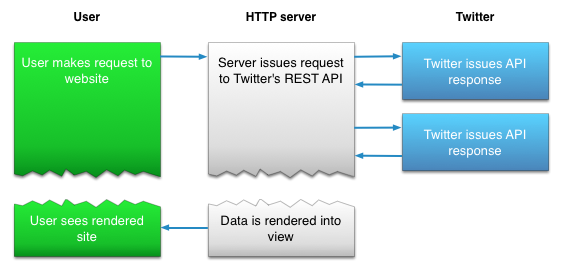
4.  Twitter offers two APIs: The REST API allows developers to access core Twitter data and the Search API provides methods for developers to interact with Twitter Search and trends data.

5.  Amazon's Product Advertising API :gives developers access to Amazon's product selection and discovery functionality to advertise Amazon products to monetize a website.

Friday, 9 June 2017

Sass

What is SASS?

SASS (Syntactically Awesome Stylesheet) is a CSS pre-processor, which helps to reduce repetition with CSS and saves time. It is more stable and powerful CSS extension language that describes the style of a document cleanly and structurally.

History

It was initially designed by Hampton Catlin and developed by Natalie Weizenbaum in 2006. Later, Weizenbaum and Chris Eppstein used its initial version to extend the Sass with SassScript.

Why to Use SASS?

  • It is a pre-processing language which provides indented syntax (its own syntax) for CSS.
  • It provides some features, which are used for creating stylesheets that allows writing code more efficiently and is easy to maintain.
  • It is a super set of CSS, which means it contains all the features of CSS and is an open source pre-processor, coded in Ruby.
  • It provides the document style in a good, structured format than flat CSS. It uses re-usable methods, logic statements and some of the built-in functions such as color manipulation, mathematics and parameter lists.

Features of SASS

  • It is more stable, powerful, and compatible with versions of CSS.
  • It is a super set of CSS and is based on JavaScript.
  • It is known as syntactic sugar for CSS, which means it makes easier way for user to read or express the things more clearly.
  • It uses its own syntax and compiles to readable CSS.
  • You can easily write CSS in less code within less time.
  • It is an open source pre-processor, which is interpreted into CSS.

    Advantages of SASS

  • It allows writing clean CSS in a programming construct.
  • It helps in writing CSS quickly.
  • It is a superset of CSS, which helps designers and developers work more efficiently and quickly.
  • As Sass is compatible with all versions of CSS, we can use any available CSS libraries.
  • It is possible to use nested syntax and useful functions such as color manipulation, mathematics and other values.

    Disadvantages of SASS

  • It takes time for a developer to learn new features present in this pre-processor.
  • If many people are working on the same site, then should use the same preprocessor. Some people use Sass and some people use CSS to edit the files directly. Therefore, it becomes difficult to work on the site.
  • There are chances of losing benefits of browser's built-in element inspector.

Thursday, 8 June 2017

Node.js MongoDB

Node.js MongoDB

  • Node.js can be used in database applications.
  • One of the most popular NoSQL database is MongoDB.

Creating a Database(table)

var MongoClient = require('mongodb').MongoClient;
var url = "mongodb://localhost:27017/mydb";

MongoClient.connect(url, function(err, db) {
  if (err) throw err;
  console.log("Database created!");
  db.close();
});

Save the code above in a file called "demo_create_mongo_db.js" and run the file:

C:\Users\Your Name>node demo_create_mongo_db.js 
Which will give you this result:

Database created!

Creating a Table

 var MongoClient = require('mongodb').MongoClient;
var url = "mongodb://localhost:27017/mydb";

MongoClient.connect(url, function(err, db) {
  if (err) throw err;
  db.createCollection("customers", function(err, res) {
    if (err) throw err;
    console.log("Table created!");
    db.close();
  });
});

Save the code above in a file called "demo_create_mongo_table.js" and run the file:

C:\Users\Your Name>node demo_create_mongo_table.js 
Which will give you this result:
Table created!

Insert Into Tabe

var MongoClient = require('mongodb').MongoClient;
var url = "mongodb://localhost:27017/mydb";

MongoClient.connect(url, function(err, db) {
  if (err) throw err;
  var myobj = { name: "Company Inc", address: "Highway 37" };
  db.collection("customers").insertOne(myobj, function(err, res) {
    if (err) throw err;
    console.log("1 record inserted");
    db.close();
  });
}); 


var MongoClient = require('mongodb').MongoClient;
var url = "mongodb://localhost:27017/mydb";

MongoClient.connect(url, function(err, db) {
  if (err) throw err;
  var myobj = [
    { name: 'John', address: 'Highway 71'},
    { name: 'Peter', address: 'Lowstreet 4'},
    { name: 'Amy', address: 'Apple st 652'},
    { name: 'Hannah', address: 'Mountain 21'},
    { name: 'Michael', address: 'Valley 345'},
    { name: 'Sandy', address: 'Ocean blvd 2'},
    { name: 'Betty', address: 'Green Grass 1'},
    { name: 'Richard', address: 'Sky st 331'},
    { name: 'Susan', address: 'One way 98'},
    { name: 'Vicky', address: 'Yellow Garden 2'},
    { name: 'Ben', address: 'Park Lane 38'},
    { name: 'William', address: 'Central st 954'},
    { name: 'Chuck', address: 'Main Road 989'},
    { name: 'Viola', address: 'Sideway 1633'}
  ];
  db.collection("customers").insert(myobj, function(err, res) {
    if (err) throw err;
    console.log("Number of records inserted: " + res.insertedCount);
    db.close();
  });
}); 

  Save the code above in a file called "demo_mongodb_insert.js" and run the file:

C:\Users\Your Name>node demo_mongodb_insert.js 
Which will give you this result:

1 record inserted

Select One from form

var http = require('http');
var MongoClient = require('mongodb').MongoClient;
var url = "mongodb://localhost:27017/mydb";

MongoClient.connect(url, function(err, db) {
  if (err) throw err;
  db.collection("customers").findOne({}, function(err, result) {
    if (err) throw err;
    console.log(result.name);
    db.close();
  });
}); 

Save the code above in a file called "demo_mongodb_findone.js" and run the file:

C:\Users\Your Name>node demo_mongodb_findone.js 
Which will give you this result:
Company Inc.

Select All

var MongoClient = require('mongodb').MongoClient;
var url = "mongodb://localhost:27017/mydb";

MongoClient.connect(url, function(err, db) {
  if (err) throw err;
  db.collection("customers").find({}).toArray(function(err, result) {
    if (err) throw err;
    console.log(result);
    db.close();
  });
});

Filter the Result

var http = require('http');
var MongoClient = require('mongodb').MongoClient;
var url = "mongodb://localhost:27017/mydb";

MongoClient.connect(url, function(err, db) {
  if (err) throw err;
  var query = { address: "Park Lane 38" };
  db.collection("customers").find(query).toArray(function(err, result) {
    if (err) throw err;
    console.log(result);
    db.close();
  });
});

Save the code above in a file called "demo_mongodb_query.js" and run the file:

C:\Users\Your Name>node demo_mongodb_query.js 
Which will give you this result:

[
  { _id: 58fdbf5c0ef8a50b4cdd9a8e , name: 'Ben', address: 'Park Lane 38' }
]

Last day at Uki

Before Uki, I don’t know the fact that coding is like an ocean. Because I studied HTML and CSS only. I had some weaknesses like stage f...

Popular posts