Labels

Tuesday, 18 July 2017

HackerRank


HackerRank is a technology company that focuses on competitive programming challenges for both consumers and businesses, where developers compete by trying to program according to provided specifications. HackerRank's programming challenges can be solved in a variety of programming languages (including Java, C++, PHP, Python, SQL) and span multiple computer science domains.
On the consumer side, when a programmer submits a solution to a programming challenge, their submission is scored on the accuracy of their output and the execution time of their solution. Programmers are then ranked globally on the HackerRank leaderboard and earn badges based on their accomplishments to drive competition among users. In addition to individual programming challenges, HackerRank also hosts contests (often referred to by HackerRank as "CodeSprints") where users compete on the same programming challenges during a set period of time and are then ranked at the conclusion of the event. HackerRank is seen as a market leader in the growing gamification trend within competitive computer programming and the consumer-side of their website is free for coders to use.

Note:-
             HackerRank was founded as InterviewStreet by two NIT Trichy alumni Vivek Ravisankar and Hari Karunanidhi. HackerRank is a Y Combinator-backed company, and was the first Indian company accepted into Y Combinator. They also participated in TechCrunch Disrupt in 2012, and currently have venture capital backing from Khosla Ventures and Battery Ventures.

Thursday, 6 July 2017

ReactJS basics

React is front end library developed by Facebook. It's used for handling view layer for web and mobile apps.
ReactJS allows us to create reusable UI components.
It is currently one of the most popular JavaScript libraries and it has strong foundation and large community behind it.

React Features
  • JSX − JSX is JavaScript syntax extension. It isn't necessary to use JSX in React development, but it is recommended.
  • Components − React is all about components. You need to think of everything as a component. This will help you to maintain the code when working on larger scale projects.
  • Unidirectional data flow and Flux − React implements one way data flow which makes it easy to reason about your app. Flux is a pattern that helps keeping your data unidirectional.
  • License − React is licensed under the Facebook Inc. Documentation is licensed under CC BY 4.0.
 React Advantages
  • React uses virtual DOM which is JavaScript object. This will improve apps performance since JavaScript virtual DOM is faster than the regular DOM.
  • React can be used on client and server side.
  • Component and Data patterns improve readability which helps to maintain larger apps.
  • React can be used with other frameworks.
React Limitations
  • React only covers view layer of the app so you still need to choose other technologies to get a complete tooling set for development.
  • React is using inline templating and JSX. This can seem awkward to some developers.
     

Wednesday, 21 June 2017

ExpressJS

ExpressJS is a web application framework that provides you with a simple API to build websites, web apps and back ends.

What is Express?

Express provides a minimal interface to build our applications. It provides us the tools that are required to build our app. It is flexible as there are numerous modules available on npm, which can be directly plugged into Express.

Why Express?

Unlike its competitors like Rails and Django, which have an opinionated way of building applications, Express has no "best way" to do something. It is very flexible and pluggable.

We have set up the development, now it is time to start developing our first app using Express. Create a new file called index.js and type the following in it.

 
var express = require('express');
var app = express();

app.get('/', function(req, res){
   res.send("Hello world!");
});

app.listen(3000);
Save the file, go to your terminal and type the following.
nodemon index.js
 
 
This will start the server. To test this app, open your browser and go to http://localhost:3000 and a message will be displayed as in the following screenshot.


Thursday, 15 June 2017

AJAX

AJAX

  • Update a web page without reloading the page
  • Request data from a server - after the page has loaded
  • Receive data from a server - after the page has loaded
  • Send data to a server - in the background

Example

<!DOCTYPE html>
<html>
<body>

<div id="demo">
  <h2>Let AJAX change this text</h2>
  <button type="button" onclick="loadDoc()">Change Content</button>
</div>

</body>
</html>
  • The HTML page contains a <div> section and a <button>.
  • The <div> section is used to display information from a server.
  • The <button> calls a function (if it is clicked).
The function requests data from a web server and displays it:
  
function loadDoc() {
  var xhttp = new XMLHttpRequest();
  xhttp.onreadystatechange = function() {
    if (this.readyState == 4 && this.status == 200) {
     document.getElementById("demo").innerHTML = this.responseText;
    }
  };
  xhttp.open("GET", "ajax_info.txt", true);
  xhttp.send();
}

What is AJAX?

  • AJAX = Asynchronous JavaScript And XML.
  • AJAX is not a programming language.
  • AJAX just uses a combination of:
  • A browser built-in XMLHttpRequest object (to request data from a web server)
  • JavaScript and HTML DOM (to display or use the data)

Tuesday, 13 June 2017

API - application program interface

API - application program interface

Application program interface (API) is a set of routines, protocols, and tools for building software applications. An API specifies how software components should interact. Additionally, APIs are used when programming graphical user interface (GUI) components. A good API makes it easier to develop a program by providing all the building blocks. A programmer then puts the blocks together.

Different Types of APIs

There are many different types of APIs for operating systems, applications or websites. Windows, for example, has many API sets that are used by system hardware and applications — when you copy and paste text from one application to another, it is the API that allows that to work.

Most operating environments, such as MS-Windows, provide APIs, allowing programmers to write applications consistent with the operating environment. Today, APIs are also specified by websites. For example, Amazon or eBay APIs allow developers to use the existing retail infrastructure to create specialized web stores. Third-party software developers also use Web APIs to create software solutions for end-users.

Popular API Examples

ProgrammableWeb, a site that tracks more than 15,500 APIs, lists Google Maps, Twitter, YouTube, Flickr and Amazon Product Advertising as some of the the most popular APIs. The following list contains several examples of popular APIs:

1. Google maps API: Google Maps APIs lets developers embed Google Maps on webpages using a JavaScript or Flash interface. The Google Maps API is designed to work on mobile devices and desktop browsers.

2.  YouTube API: Google's APIs lets developers integrate YouTube videos and functionality into websites or applications. YouTube APIs include the YouTube Analytics API, YouTube Data API, YouTube Live Streaming API, YouTube Player APIs and others.

3.  The Flickr API is used by developers to access the Flick photo sharing community data. The Flickr API consists of a set of callable methods, and some API endpoints.

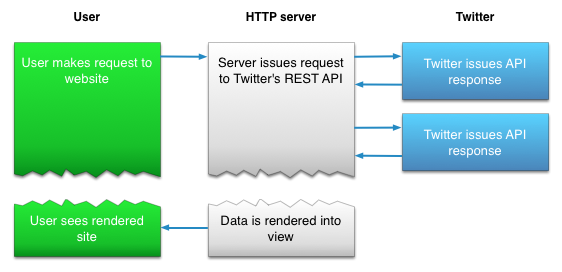
4.  Twitter offers two APIs: The REST API allows developers to access core Twitter data and the Search API provides methods for developers to interact with Twitter Search and trends data.

5.  Amazon's Product Advertising API :gives developers access to Amazon's product selection and discovery functionality to advertise Amazon products to monetize a website.

Last day at Uki

Before Uki, I don’t know the fact that coding is like an ocean. Because I studied HTML and CSS only. I had some weaknesses like stage f...

Popular posts