Labels

Wednesday, 21 June 2017

ExpressJS

ExpressJS is a web application framework that provides you with a simple API to build websites, web apps and back ends.

What is Express?

Express provides a minimal interface to build our applications. It provides us the tools that are required to build our app. It is flexible as there are numerous modules available on npm, which can be directly plugged into Express.

Why Express?

Unlike its competitors like Rails and Django, which have an opinionated way of building applications, Express has no "best way" to do something. It is very flexible and pluggable.

We have set up the development, now it is time to start developing our first app using Express. Create a new file called index.js and type the following in it.

 
var express = require('express');
var app = express();

app.get('/', function(req, res){
   res.send("Hello world!");
});

app.listen(3000);
Save the file, go to your terminal and type the following.
nodemon index.js
 
 
This will start the server. To test this app, open your browser and go to http://localhost:3000 and a message will be displayed as in the following screenshot.


Thursday, 15 June 2017

AJAX

AJAX

  • Update a web page without reloading the page
  • Request data from a server - after the page has loaded
  • Receive data from a server - after the page has loaded
  • Send data to a server - in the background

Example

<!DOCTYPE html>
<html>
<body>

<div id="demo">
  <h2>Let AJAX change this text</h2>
  <button type="button" onclick="loadDoc()">Change Content</button>
</div>

</body>
</html>
  • The HTML page contains a <div> section and a <button>.
  • The <div> section is used to display information from a server.
  • The <button> calls a function (if it is clicked).
The function requests data from a web server and displays it:
  
function loadDoc() {
  var xhttp = new XMLHttpRequest();
  xhttp.onreadystatechange = function() {
    if (this.readyState == 4 && this.status == 200) {
     document.getElementById("demo").innerHTML = this.responseText;
    }
  };
  xhttp.open("GET", "ajax_info.txt", true);
  xhttp.send();
}

What is AJAX?

  • AJAX = Asynchronous JavaScript And XML.
  • AJAX is not a programming language.
  • AJAX just uses a combination of:
  • A browser built-in XMLHttpRequest object (to request data from a web server)
  • JavaScript and HTML DOM (to display or use the data)

Tuesday, 13 June 2017

API - application program interface

API - application program interface

Application program interface (API) is a set of routines, protocols, and tools for building software applications. An API specifies how software components should interact. Additionally, APIs are used when programming graphical user interface (GUI) components. A good API makes it easier to develop a program by providing all the building blocks. A programmer then puts the blocks together.

Different Types of APIs

There are many different types of APIs for operating systems, applications or websites. Windows, for example, has many API sets that are used by system hardware and applications — when you copy and paste text from one application to another, it is the API that allows that to work.

Most operating environments, such as MS-Windows, provide APIs, allowing programmers to write applications consistent with the operating environment. Today, APIs are also specified by websites. For example, Amazon or eBay APIs allow developers to use the existing retail infrastructure to create specialized web stores. Third-party software developers also use Web APIs to create software solutions for end-users.

Popular API Examples

ProgrammableWeb, a site that tracks more than 15,500 APIs, lists Google Maps, Twitter, YouTube, Flickr and Amazon Product Advertising as some of the the most popular APIs. The following list contains several examples of popular APIs:

1. Google maps API: Google Maps APIs lets developers embed Google Maps on webpages using a JavaScript or Flash interface. The Google Maps API is designed to work on mobile devices and desktop browsers.

2.  YouTube API: Google's APIs lets developers integrate YouTube videos and functionality into websites or applications. YouTube APIs include the YouTube Analytics API, YouTube Data API, YouTube Live Streaming API, YouTube Player APIs and others.

3.  The Flickr API is used by developers to access the Flick photo sharing community data. The Flickr API consists of a set of callable methods, and some API endpoints.

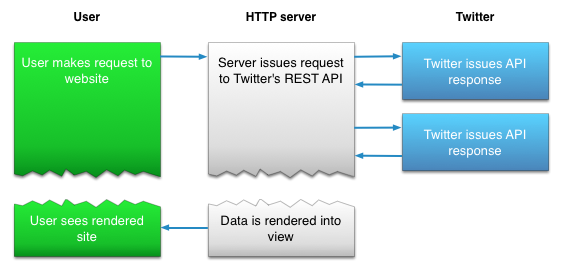
4.  Twitter offers two APIs: The REST API allows developers to access core Twitter data and the Search API provides methods for developers to interact with Twitter Search and trends data.

5.  Amazon's Product Advertising API :gives developers access to Amazon's product selection and discovery functionality to advertise Amazon products to monetize a website.

Friday, 9 June 2017

Sass

What is SASS?

SASS (Syntactically Awesome Stylesheet) is a CSS pre-processor, which helps to reduce repetition with CSS and saves time. It is more stable and powerful CSS extension language that describes the style of a document cleanly and structurally.

History

It was initially designed by Hampton Catlin and developed by Natalie Weizenbaum in 2006. Later, Weizenbaum and Chris Eppstein used its initial version to extend the Sass with SassScript.

Why to Use SASS?

  • It is a pre-processing language which provides indented syntax (its own syntax) for CSS.
  • It provides some features, which are used for creating stylesheets that allows writing code more efficiently and is easy to maintain.
  • It is a super set of CSS, which means it contains all the features of CSS and is an open source pre-processor, coded in Ruby.
  • It provides the document style in a good, structured format than flat CSS. It uses re-usable methods, logic statements and some of the built-in functions such as color manipulation, mathematics and parameter lists.

Features of SASS

  • It is more stable, powerful, and compatible with versions of CSS.
  • It is a super set of CSS and is based on JavaScript.
  • It is known as syntactic sugar for CSS, which means it makes easier way for user to read or express the things more clearly.
  • It uses its own syntax and compiles to readable CSS.
  • You can easily write CSS in less code within less time.
  • It is an open source pre-processor, which is interpreted into CSS.

    Advantages of SASS

  • It allows writing clean CSS in a programming construct.
  • It helps in writing CSS quickly.
  • It is a superset of CSS, which helps designers and developers work more efficiently and quickly.
  • As Sass is compatible with all versions of CSS, we can use any available CSS libraries.
  • It is possible to use nested syntax and useful functions such as color manipulation, mathematics and other values.

    Disadvantages of SASS

  • It takes time for a developer to learn new features present in this pre-processor.
  • If many people are working on the same site, then should use the same preprocessor. Some people use Sass and some people use CSS to edit the files directly. Therefore, it becomes difficult to work on the site.
  • There are chances of losing benefits of browser's built-in element inspector.

Thursday, 8 June 2017

Node.js MongoDB

Node.js MongoDB

  • Node.js can be used in database applications.
  • One of the most popular NoSQL database is MongoDB.

Creating a Database(table)

var MongoClient = require('mongodb').MongoClient;
var url = "mongodb://localhost:27017/mydb";

MongoClient.connect(url, function(err, db) {
  if (err) throw err;
  console.log("Database created!");
  db.close();
});

Save the code above in a file called "demo_create_mongo_db.js" and run the file:

C:\Users\Your Name>node demo_create_mongo_db.js 
Which will give you this result:

Database created!

Creating a Table

 var MongoClient = require('mongodb').MongoClient;
var url = "mongodb://localhost:27017/mydb";

MongoClient.connect(url, function(err, db) {
  if (err) throw err;
  db.createCollection("customers", function(err, res) {
    if (err) throw err;
    console.log("Table created!");
    db.close();
  });
});

Save the code above in a file called "demo_create_mongo_table.js" and run the file:

C:\Users\Your Name>node demo_create_mongo_table.js 
Which will give you this result:
Table created!

Insert Into Tabe

var MongoClient = require('mongodb').MongoClient;
var url = "mongodb://localhost:27017/mydb";

MongoClient.connect(url, function(err, db) {
  if (err) throw err;
  var myobj = { name: "Company Inc", address: "Highway 37" };
  db.collection("customers").insertOne(myobj, function(err, res) {
    if (err) throw err;
    console.log("1 record inserted");
    db.close();
  });
}); 


var MongoClient = require('mongodb').MongoClient;
var url = "mongodb://localhost:27017/mydb";

MongoClient.connect(url, function(err, db) {
  if (err) throw err;
  var myobj = [
    { name: 'John', address: 'Highway 71'},
    { name: 'Peter', address: 'Lowstreet 4'},
    { name: 'Amy', address: 'Apple st 652'},
    { name: 'Hannah', address: 'Mountain 21'},
    { name: 'Michael', address: 'Valley 345'},
    { name: 'Sandy', address: 'Ocean blvd 2'},
    { name: 'Betty', address: 'Green Grass 1'},
    { name: 'Richard', address: 'Sky st 331'},
    { name: 'Susan', address: 'One way 98'},
    { name: 'Vicky', address: 'Yellow Garden 2'},
    { name: 'Ben', address: 'Park Lane 38'},
    { name: 'William', address: 'Central st 954'},
    { name: 'Chuck', address: 'Main Road 989'},
    { name: 'Viola', address: 'Sideway 1633'}
  ];
  db.collection("customers").insert(myobj, function(err, res) {
    if (err) throw err;
    console.log("Number of records inserted: " + res.insertedCount);
    db.close();
  });
}); 

  Save the code above in a file called "demo_mongodb_insert.js" and run the file:

C:\Users\Your Name>node demo_mongodb_insert.js 
Which will give you this result:

1 record inserted

Select One from form

var http = require('http');
var MongoClient = require('mongodb').MongoClient;
var url = "mongodb://localhost:27017/mydb";

MongoClient.connect(url, function(err, db) {
  if (err) throw err;
  db.collection("customers").findOne({}, function(err, result) {
    if (err) throw err;
    console.log(result.name);
    db.close();
  });
}); 

Save the code above in a file called "demo_mongodb_findone.js" and run the file:

C:\Users\Your Name>node demo_mongodb_findone.js 
Which will give you this result:
Company Inc.

Select All

var MongoClient = require('mongodb').MongoClient;
var url = "mongodb://localhost:27017/mydb";

MongoClient.connect(url, function(err, db) {
  if (err) throw err;
  db.collection("customers").find({}).toArray(function(err, result) {
    if (err) throw err;
    console.log(result);
    db.close();
  });
});

Filter the Result

var http = require('http');
var MongoClient = require('mongodb').MongoClient;
var url = "mongodb://localhost:27017/mydb";

MongoClient.connect(url, function(err, db) {
  if (err) throw err;
  var query = { address: "Park Lane 38" };
  db.collection("customers").find(query).toArray(function(err, result) {
    if (err) throw err;
    console.log(result);
    db.close();
  });
});

Save the code above in a file called "demo_mongodb_query.js" and run the file:

C:\Users\Your Name>node demo_mongodb_query.js 
Which will give you this result:

[
  { _id: 58fdbf5c0ef8a50b4cdd9a8e , name: 'Ben', address: 'Park Lane 38' }
]

Wednesday, 7 June 2017

JSON

JSON

 
  • JSON: JavaScript Object Notation.
  • JSON is a syntax for storing and exchanging data.
  • JSON is text, written with JavaScript object notation.

Exchanging Data

  • When exchanging data between a browser and a server, the data can only be text.
  • JSON is text, and we can convert any JavaScript object into JSON, and send JSON to the server.
  • We can also convert any JSON received from the server into JavaScript objects.
  • This way we can work with the data as JavaScript objects, with no complicated parsing and translations.

Sending Data

If you have data stored in a JavaScript object, you can convert the object into JSON, and send it to a server:

Example

var myObj = { "name":"John", "age":31, "city":"New York" };
var myJSON = JSON.stringify(myObj);
window.location = "demo_json.php?x=" + myJSON;
You will learn more about the JSON.stringify() function later in this tutorial.

Receiving Data

If you receive data in JSON format, you can convert it into a JavaScript object:

Example

var myJSON = '{ "name":"John", "age":31, "city":"New York" }';
var myObj = JSON.parse(myJSON);
document.getElementById("demo").innerHTML = myObj.name;

Monday, 29 May 2017

Introduction to node js

 What is Node.js?

  • Node.js is an open source server framework
  • Node.js is free
  • Node.js runs on various platforms (Windows, Linux, Unix, Mac OS X, etc.)
  • Node.js uses JavaScript on the server

Why Node.js?

  1. Sends the task to the computer's file system.
  2. Ready to handle the next request.
  3. When the file system has opened and read the file, the server returns the content to the client.
Node.js eliminates the waiting, and simply continues with the next request.
Node.js runs single-threaded, non-blocking, asynchronously programming, which is very memory efficient.

What Can Node.js Do?

  • Node.js can generate dynamic page content
  • Node.js can create, open, read, write, delete, and close files on the server
  • Node.js can collect form data
  • Node.js can add, delete, modify data in your database

What is a Node.js File?

  • Node.js files contain tasks that will be executed on certain events
  • A typical event is someone trying to access a port on the server
  • Node.js files must be initiated on the server before having any effect
  • Node.js files have extension ".js"

Last day at Uki

Before Uki, I don’t know the fact that coding is like an ocean. Because I studied HTML and CSS only. I had some weaknesses like stage f...

Popular posts