Labels

Friday, 9 June 2017

Sass

What is SASS?

SASS (Syntactically Awesome Stylesheet) is a CSS pre-processor, which helps to reduce repetition with CSS and saves time. It is more stable and powerful CSS extension language that describes the style of a document cleanly and structurally.

History

It was initially designed by Hampton Catlin and developed by Natalie Weizenbaum in 2006. Later, Weizenbaum and Chris Eppstein used its initial version to extend the Sass with SassScript.

Why to Use SASS?

  • It is a pre-processing language which provides indented syntax (its own syntax) for CSS.
  • It provides some features, which are used for creating stylesheets that allows writing code more efficiently and is easy to maintain.
  • It is a super set of CSS, which means it contains all the features of CSS and is an open source pre-processor, coded in Ruby.
  • It provides the document style in a good, structured format than flat CSS. It uses re-usable methods, logic statements and some of the built-in functions such as color manipulation, mathematics and parameter lists.

Features of SASS

  • It is more stable, powerful, and compatible with versions of CSS.
  • It is a super set of CSS and is based on JavaScript.
  • It is known as syntactic sugar for CSS, which means it makes easier way for user to read or express the things more clearly.
  • It uses its own syntax and compiles to readable CSS.
  • You can easily write CSS in less code within less time.
  • It is an open source pre-processor, which is interpreted into CSS.

    Advantages of SASS

  • It allows writing clean CSS in a programming construct.
  • It helps in writing CSS quickly.
  • It is a superset of CSS, which helps designers and developers work more efficiently and quickly.
  • As Sass is compatible with all versions of CSS, we can use any available CSS libraries.
  • It is possible to use nested syntax and useful functions such as color manipulation, mathematics and other values.

    Disadvantages of SASS

  • It takes time for a developer to learn new features present in this pre-processor.
  • If many people are working on the same site, then should use the same preprocessor. Some people use Sass and some people use CSS to edit the files directly. Therefore, it becomes difficult to work on the site.
  • There are chances of losing benefits of browser's built-in element inspector.

Thursday, 8 June 2017

Node.js MongoDB

Node.js MongoDB

  • Node.js can be used in database applications.
  • One of the most popular NoSQL database is MongoDB.

Creating a Database(table)

var MongoClient = require('mongodb').MongoClient;
var url = "mongodb://localhost:27017/mydb";

MongoClient.connect(url, function(err, db) {
  if (err) throw err;
  console.log("Database created!");
  db.close();
});

Save the code above in a file called "demo_create_mongo_db.js" and run the file:

C:\Users\Your Name>node demo_create_mongo_db.js 
Which will give you this result:

Database created!

Creating a Table

 var MongoClient = require('mongodb').MongoClient;
var url = "mongodb://localhost:27017/mydb";

MongoClient.connect(url, function(err, db) {
  if (err) throw err;
  db.createCollection("customers", function(err, res) {
    if (err) throw err;
    console.log("Table created!");
    db.close();
  });
});

Save the code above in a file called "demo_create_mongo_table.js" and run the file:

C:\Users\Your Name>node demo_create_mongo_table.js 
Which will give you this result:
Table created!

Insert Into Tabe

var MongoClient = require('mongodb').MongoClient;
var url = "mongodb://localhost:27017/mydb";

MongoClient.connect(url, function(err, db) {
  if (err) throw err;
  var myobj = { name: "Company Inc", address: "Highway 37" };
  db.collection("customers").insertOne(myobj, function(err, res) {
    if (err) throw err;
    console.log("1 record inserted");
    db.close();
  });
}); 


var MongoClient = require('mongodb').MongoClient;
var url = "mongodb://localhost:27017/mydb";

MongoClient.connect(url, function(err, db) {
  if (err) throw err;
  var myobj = [
    { name: 'John', address: 'Highway 71'},
    { name: 'Peter', address: 'Lowstreet 4'},
    { name: 'Amy', address: 'Apple st 652'},
    { name: 'Hannah', address: 'Mountain 21'},
    { name: 'Michael', address: 'Valley 345'},
    { name: 'Sandy', address: 'Ocean blvd 2'},
    { name: 'Betty', address: 'Green Grass 1'},
    { name: 'Richard', address: 'Sky st 331'},
    { name: 'Susan', address: 'One way 98'},
    { name: 'Vicky', address: 'Yellow Garden 2'},
    { name: 'Ben', address: 'Park Lane 38'},
    { name: 'William', address: 'Central st 954'},
    { name: 'Chuck', address: 'Main Road 989'},
    { name: 'Viola', address: 'Sideway 1633'}
  ];
  db.collection("customers").insert(myobj, function(err, res) {
    if (err) throw err;
    console.log("Number of records inserted: " + res.insertedCount);
    db.close();
  });
}); 

  Save the code above in a file called "demo_mongodb_insert.js" and run the file:

C:\Users\Your Name>node demo_mongodb_insert.js 
Which will give you this result:

1 record inserted

Select One from form

var http = require('http');
var MongoClient = require('mongodb').MongoClient;
var url = "mongodb://localhost:27017/mydb";

MongoClient.connect(url, function(err, db) {
  if (err) throw err;
  db.collection("customers").findOne({}, function(err, result) {
    if (err) throw err;
    console.log(result.name);
    db.close();
  });
}); 

Save the code above in a file called "demo_mongodb_findone.js" and run the file:

C:\Users\Your Name>node demo_mongodb_findone.js 
Which will give you this result:
Company Inc.

Select All

var MongoClient = require('mongodb').MongoClient;
var url = "mongodb://localhost:27017/mydb";

MongoClient.connect(url, function(err, db) {
  if (err) throw err;
  db.collection("customers").find({}).toArray(function(err, result) {
    if (err) throw err;
    console.log(result);
    db.close();
  });
});

Filter the Result

var http = require('http');
var MongoClient = require('mongodb').MongoClient;
var url = "mongodb://localhost:27017/mydb";

MongoClient.connect(url, function(err, db) {
  if (err) throw err;
  var query = { address: "Park Lane 38" };
  db.collection("customers").find(query).toArray(function(err, result) {
    if (err) throw err;
    console.log(result);
    db.close();
  });
});

Save the code above in a file called "demo_mongodb_query.js" and run the file:

C:\Users\Your Name>node demo_mongodb_query.js 
Which will give you this result:

[
  { _id: 58fdbf5c0ef8a50b4cdd9a8e , name: 'Ben', address: 'Park Lane 38' }
]

Wednesday, 7 June 2017

JSON

JSON

 
  • JSON: JavaScript Object Notation.
  • JSON is a syntax for storing and exchanging data.
  • JSON is text, written with JavaScript object notation.

Exchanging Data

  • When exchanging data between a browser and a server, the data can only be text.
  • JSON is text, and we can convert any JavaScript object into JSON, and send JSON to the server.
  • We can also convert any JSON received from the server into JavaScript objects.
  • This way we can work with the data as JavaScript objects, with no complicated parsing and translations.

Sending Data

If you have data stored in a JavaScript object, you can convert the object into JSON, and send it to a server:

Example

var myObj = { "name":"John", "age":31, "city":"New York" };
var myJSON = JSON.stringify(myObj);
window.location = "demo_json.php?x=" + myJSON;
You will learn more about the JSON.stringify() function later in this tutorial.

Receiving Data

If you receive data in JSON format, you can convert it into a JavaScript object:

Example

var myJSON = '{ "name":"John", "age":31, "city":"New York" }';
var myObj = JSON.parse(myJSON);
document.getElementById("demo").innerHTML = myObj.name;

Monday, 29 May 2017

Introduction to node js

 What is Node.js?

  • Node.js is an open source server framework
  • Node.js is free
  • Node.js runs on various platforms (Windows, Linux, Unix, Mac OS X, etc.)
  • Node.js uses JavaScript on the server

Why Node.js?

  1. Sends the task to the computer's file system.
  2. Ready to handle the next request.
  3. When the file system has opened and read the file, the server returns the content to the client.
Node.js eliminates the waiting, and simply continues with the next request.
Node.js runs single-threaded, non-blocking, asynchronously programming, which is very memory efficient.

What Can Node.js Do?

  • Node.js can generate dynamic page content
  • Node.js can create, open, read, write, delete, and close files on the server
  • Node.js can collect form data
  • Node.js can add, delete, modify data in your database

What is a Node.js File?

  • Node.js files contain tasks that will be executed on certain events
  • A typical event is someone trying to access a port on the server
  • Node.js files must be initiated on the server before having any effect
  • Node.js files have extension ".js"

Wednesday, 24 May 2017

MongoDB

MongoDB is a cross-platform, document oriented database that provides, high performance, high availability, and easy scalability. MongoDB works on concept of collection and document.

Database

Database is a physical container for collections. Each database gets its own set of files on the file system. A single MongoDB server typically has multiple databases.

Collection

Collection is a group of MongoDB documents. It is the equivalent of an RDBMS table. A collection exists within a single database. Collections do not enforce a schema. Documents within a collection can have different fields. Typically, all documents in a collection are of similar or related purpose.

Document

A document is a set of key-value pairs. Documents have dynamic schema. Dynamic schema means that documents in the same collection do not need to have the same set of fields or structure, and common fields in a collection's documents may hold different types of data.

The following table shows the relationship of RDBMS terminology with MongoDB.
RDBMS MongoDB
Database Database
Table Collection
Tuple/Row Document
column Field
Table Join Embedded Documents
Primary Key Primary Key (Default key _id provided by mongodb itself)


Database Server and Client
Mysqld/Oracle mongod
mysql/sqlplus mongo


Advantages of MongoDB over RDBMS

  • Schema less − MongoDB is a document database in which one collection holds different documents. Number of fields, content and size of the document can differ from one document to another.
  • Structure of a single object is clear.
  • No complex joins.
  • Deep query-ability. MongoDB supports dynamic queries on documents using a document-based query language that's nearly as powerful as SQL.
  • Tuning.
  • Ease of scale-out − MongoDB is easy to scale.
  • Conversion/mapping of application objects to database objects not needed.
  • Uses internal memory for storing the (windowed) working set, enabling faster access of data.

Why Use MongoDB?

  • Document Oriented Storage − Data is stored in the form of JSON style documents.
  • Index on any attribute
  • Replication and high availability
  • Auto-sharding
  • Rich queries
  • Fast in-place updates
  • Professional support by MongoDB

Where to Use MongoDB?

  • Big Data
  • Content Management and Delivery
  • Mobile and Social Infrastructure
  • User Data Management
  • Data Hub

Tuesday, 23 May 2017

DATABASE (Back-end)

DATABASE (DB)


A database is a collection of information that is organized so that it can be easily accessed, managed and updated.
Data is organized into rows, columns and tables, and it is indexed to make it easier to find relevant information. Data gets updated, expanded and deleted as new information is added. Databases process workloads to create and update themselves, querying the data they contain and running applications against it.

Evolution of databases

Databases have evolved since their inception in the 1960s, beginning with hierarchical and network databases, through the 1980s with object-oriented-database, and today with SQL and NoSQL databases and cloud-database.

Relational database


Relational databases are made up of a set of tables with data that fits into a predefined category. Each table has at least one data category in a column, and each row has a certain data instance for the categories which are defined in the columns.
The Structure Query Language (SQL) is the standard user and application program interface for a relational database. Relational databases are easy to extend, and a new data category can be added after the original database creation without requiring that you modify all the existing applications.

Distributed database


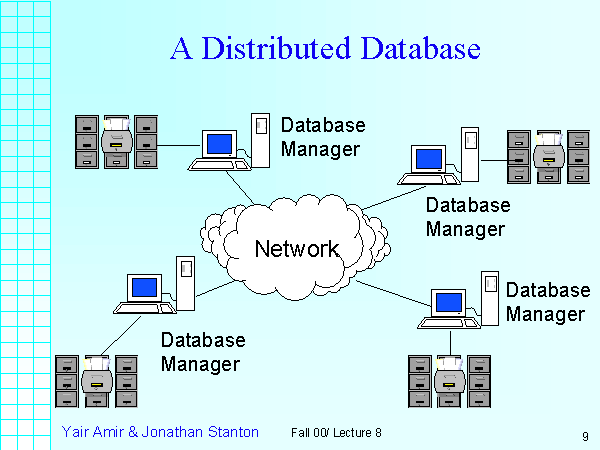
A distributed database is a database in which portions of the database are stored in multiple physical locations, and in which processing is dispersed or replicated among different points in a network.
Distributed databases can be homogeneous or heterogeneous. All the physical locations in a homogeneous distributed database system have the same underlying hardware and run the same operating systems and database applications. The hardware, operating systems or database applications in a heterogeneous distributed database may be different at each of the locations.

Cloud database


A cloud database is a database that has been optimized or built for a virtualized environment, either in a hybrid cloud, public cloud or private cloud. Cloud databases provide benefits such as the ability to pay for storage capacity and bandwidth on a per-use basis, and they provide scalability on demand, along with high availability.
A cloud database also gives enterprises the opportunity to support business applications in a software-as-a-system deployment.

NoSQL database


NoSQL Database are useful for large sets of distributed data.
NoSQL databases are effective for big data performance issues that relational databases aren't built to solve. They are most effective when an organization must analyze large chunks of unstructured data or data that's stored across multiple virtual servers in the cloud.

Object-oriented database


Items created using object-oriented-database are often stored in relational databases, but object-oriented databases are well-suited for those items.
An object-oriented database is organized around objects rather than actions, and data rather than logic. For example, a multimedia record in a relational database can be a definable data object, as opposed to an alphanumeric value.

Graph database


A graph-oriented database, or graph,database, is a type of NoSQL database that uses graph theory to store, map and query relationships. Graph databases are basically collections of nodes and edges, where each node represents an entity, and each edge represents a connection between nodes.
Graph databases are growing in popularity for analyzing interconnections. For example, companies might use a graph database to mine data about customers from social media.

Sunday, 21 May 2017

jQuery

  • jQuery is a JavaScript Library.
  • jQuery greatly simplifies JavaScript programming.
  • jQuery is easy to learn.

What is jQuery?

  • jQuery is a lightweight, "write less, do more", JavaScript library.
  • The purpose of jQuery is to make it much easier to use JavaScript on your website.
  • jQuery takes a lot of common tasks that require many lines of JavaScript code to accomplish, and wraps them into methods that you can call with a single line of code.
  • jQuery also simplifies a lot of the complicated things from JavaScript, like AJAX calls and DOM manipulation.
  • The jQuery library contains the following features:
  1. HTML/DOM manipulation
  2. CSS manipulation
  3. HTML event methods
  4. Effects and animations
  5. AJAX
  6. Utilities
The jQuery library is a single JavaScript file, and you reference it with the HTML <script> tag (notice that the <script> tag should be inside the <head> section):

<head>
<script src="jquery-3.2.1.min.js"></script>
</head>

<head>
<script src="https://ajax.googleapis.com/ajax/libs/jquery/3.2.1/jquery.min.js"></script>
</head>

<head>
<script src="https://ajax.aspnetcdn.com/ajax/jQuery/jquery-3.2.1.min.js"></script>
</head>
 

Last day at Uki

Before Uki, I don’t know the fact that coding is like an ocean. Because I studied HTML and CSS only. I had some weaknesses like stage f...

Popular posts